
Google has been crawling and indexing JavaScript since 2015. But that doesn't mean your React, Vue, or Angular application is SEO-friendly by default. Client-side rendering still forces Googlebot to spend extra crawl budget, delays indexing, and creates edge cases where content simply doesn't get discovered.
For Houston businesses running modern web applications—especially e-commerce platforms, SaaS dashboards, and dynamic directories—understanding how JavaScript affects crawling is the difference between ranking on page one and waiting weeks for Google to even see your content.
This post explains how JavaScript rendering works from Google's perspective, why crawl budget matters, and how server-side rendering (SSR) and static generation solve the problem. If your development team is choosing between frameworks or rebuilding a legacy site, this is the technical context you need.
How Googlebot Renders JavaScript (and Why It's Not the Same as Crawling HTML)#
When Googlebot crawls a traditional HTML page, it reads the source code, extracts links and content, and adds everything to Google's index within hours. Simple. Fast. Predictable.
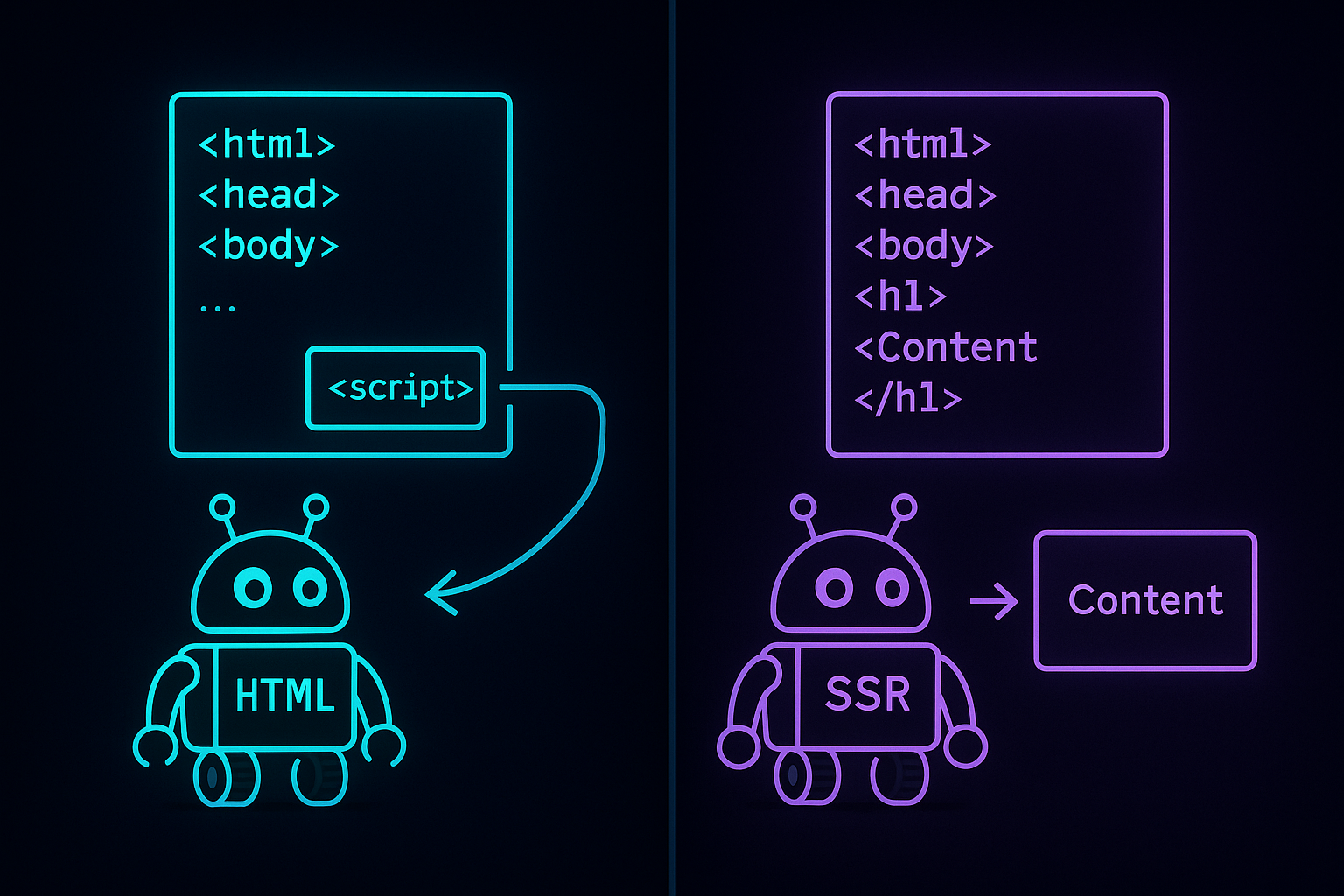
When Googlebot crawls a JavaScript application that relies on client-side rendering (CSR), the process has three stages:
- Initial crawl: Googlebot requests the page and receives a nearly empty HTML shell—usually just a
<div id="root"></div>and script tags. - Render queue: The page enters a queue where Googlebot waits to allocate rendering resources. This can take hours or days depending on your site's crawl budget and Google's capacity.
- JavaScript execution: Once resources are available, Googlebot runs your JavaScript, waits for API calls to resolve, and captures the final DOM state.
That delay—between the initial crawl and the render—is where rankings get lost. If your site publishes time-sensitive content (product drops, news, local events), a three-day rendering delay means competitors with server-rendered pages have already claimed the SERP.
Even after rendering, Googlebot's JavaScript execution environment has limitations. It doesn't wait indefinitely for lazy-loaded images, won't retry failed API requests, and can struggle with infinite scroll or complex state management. If your React app depends on user interaction to reveal content, Google might never see it.
What Crawl Budget Is and Why JavaScript Websites Burn Through It Faster#
Crawl budget is the number of pages Googlebot will crawl on your site within a given time period. Google allocates crawl budget based on your site's authority, update frequency, server speed, and crawl demand (how often users search for your content).
For small sites—under 1,000 pages—crawl budget is rarely a bottleneck. But for e-commerce platforms, franchise networks, or content-heavy directories, every wasted crawl is a ranking opportunity lost.
JavaScript websites consume more crawl budget for two reasons:
- Rendering costs resources. Google doesn't render every page it crawls immediately. Pages enter the render queue, and only a fraction get executed on any given day. If your product pages rely on JavaScript to display prices, descriptions, and structured data, they're competing for limited rendering slots.
- JavaScript apps often generate duplicate or low-value URLs. Single-page applications (SPAs) can create crawl traps—URLs with query parameters, hash fragments, or filter states that look different to Googlebot but serve identical content. Every duplicate URL Google crawls is one fewer page from your priority inventory.
Houston industrial companies often run into this when they migrate legacy catalogs to modern JavaScript frameworks without proper server-side rendering. A 5,000-product Shopify or BigCommerce site that used to get fully indexed in a week can suddenly see 60% of its catalog stuck in "Discovered – currently not indexed" status in Search Console.
"We rebuilt our parts catalog in React and organic traffic dropped 40% in three months. Google Search Console showed thousands of pages discovered but not indexed. Switching to Next.js with server-side rendering fixed it in two weeks." — Operations director, Houston industrial supply distributor
Server-Side Rendering (SSR), Static Generation (SSG), and Hybrid Solutions#
The solution is to send Googlebot fully rendered HTML on the first request—no rendering queue, no waiting, no JavaScript execution required. Modern frameworks offer three approaches:
Server-Side Rendering (SSR)#
The server runs your JavaScript on every request and sends back complete HTML. Googlebot sees the same content a user sees, instantly. Next.js, Nuxt, and SvelteKit all support SSR out of the box.
SSR is ideal for pages that change frequently—product inventory, real-time pricing, user-generated content. The tradeoff is server load: every request requires JavaScript execution on your backend. For high-traffic sites, you need proper caching and edge delivery (Vercel, Cloudflare Workers, or a CDN with edge compute).
Static Site Generation (SSG)#
The framework pre-renders all pages at build time and serves them as static HTML. Googlebot gets instant access, zero JavaScript execution required, and your hosting costs drop because you're serving flat files.
SSG works beautifully for content that doesn't change often—blogs, service pages, documentation, landing pages. Our SEO services include static generation audits for clients who want maximum crawl efficiency without sacrificing modern interactivity.
Hybrid: Incremental Static Regeneration (ISR)#
Next.js introduced ISR, which combines static generation with on-demand updates. Pages are pre-rendered and cached, but the framework regenerates stale pages in the background when new data arrives. You get the crawl efficiency of static HTML and the freshness of SSR.
ISR is the architecture we recommend for most Houston e-commerce and franchise clients. Product pages, location pages, and category indexes are pre-rendered for speed and SEO, while checkout flows and account dashboards remain client-side for interactivity.

Practical JavaScript SEO Checklist for Houston Businesses#
If your site is built with React, Vue, Angular, or another JavaScript framework, run through this checklist with your development team:
- View source on your key pages. Right-click → View Page Source. If you see
<div id="root"></div>and nothing else, Google is rendering your site the hard way. - Check Google Search Console for "Discovered – currently not indexed" errors. This status means Google found the URL but hasn't allocated crawl budget to render or index it. Common with CSR.
- Test with Google's Rich Results Test or Mobile-Friendly Test. Both tools show you what Googlebot sees after rendering. If structured data, headings, or body content is missing, JavaScript isn't executing correctly.
- Inspect server response time. If your SSR pages take longer than 600ms to respond, Google may reduce crawl rate. Use edge caching and CDN delivery to keep TTFB under 300ms.
- Eliminate duplicate parameter URLs. Use canonical tags, parameter handling in Search Console, and proper routing to prevent ?sort=, ?filter=, and ?page= URLs from fragmenting crawl budget.
- Preload critical API calls. If your page depends on an external API to display content, fetch that data server-side and inject it into the initial HTML payload. Don't make Googlebot wait for async requests.
Most technical SEO issues we see in Houston's industrial, service, and retail sectors come down to framework choices made without SEO input. A developer choosing Vite + React for speed and modern DX is making a different tradeoff than an SEO choosing Next.js for crawl efficiency and structured data delivery. Both are valid—but the business needs to know what it's trading.
When Client-Side Rendering Is Fine (and When It's Not)#
Client-side rendering isn't inherently bad for SEO. If you're building an internal dashboard, a logged-in SaaS product, or a progressive web app where SEO isn't the primary acquisition channel, CSR is simpler to build and deploy.
But if organic search drives 30%+ of your revenue—if you rely on Google to surface product pages, service pages, location pages, or blog content—then you need server-side rendering or static generation for those public routes. Reserve client-side rendering for authenticated experiences and interactive features that don't need to rank.
At Omojet, we build all public marketing sites, e-commerce catalogs, and franchise location pages with Next.js and server-side rendering by default. It costs slightly more upfront (proper caching, edge deployment, and API orchestration take time), but the SEO return is measurable within 60 days: faster indexing, better crawl coverage, and more pages ranking for long-tail keywords.
How to Audit Your JavaScript Site's Crawl Performance#
If you suspect JavaScript is holding back your rankings, here's how to confirm it:
- Run a crawl with Screaming Frog in JavaScript rendering mode. Compare the crawl with rendering enabled versus disabled. If you lose headings, body content, or internal links when JavaScript is off, Google is working harder than it should.
- Check "Crawl Stats" in Google Search Console. If average response time is over 500ms or you see a declining crawl rate trend, Google may be throttling your site due to slow server response or inefficient JavaScript execution.
- Look at "Page Indexing" report in Search Console. Filter by "Discovered – currently not indexed" and cross-reference those URLs with your rendering method. If they're all JavaScript-dependent pages, you've found the bottleneck.
- Monitor Core Web Vitals. JavaScript-heavy sites often suffer from poor Largest Contentful Paint (LCP) and Cumulative Layout Shift (CLS) because content renders late. Google uses Core Web Vitals as a ranking factor—slow JavaScript execution costs you twice.
If you need help diagnosing crawl issues or planning a migration from CSR to SSR, talk to us. We run technical audits for Houston businesses every week, and we'll tell you exactly where crawl budget is leaking and what it takes to fix it.
Why This Matters More in 2026 Than It Did Five Years Ago#
Google has improved its JavaScript rendering capabilities significantly since 2015. The WRS (Web Rendering Service) now uses a recent version of Chromium, supports modern ES6+ syntax, and handles most single-page applications without issue.
But improvement doesn't mean parity. Google still batches rendering into a queue, still allocates crawl budget conservatively, and still prioritizes sites that deliver content fast. Meanwhile, the volume of JavaScript sites has exploded—every SaaS company, e-commerce brand, and content publisher is shipping React or Vue. The competition for crawl budget is higher than ever.
The businesses that win are the ones that make it easy for Google. Server-side rendering, static generation, fast TTFB, clean internal linking, and structured data delivered in the initial HTML response. These aren't optional optimizations anymore—they're table stakes for competitive verticals.
Houston's industrial and service sectors are slower to adopt modern frameworks than tech hubs, which creates an opportunity. If your competitors are still running WordPress or legacy .NET apps, a properly architected Next.js site with SSR gives you a 6–12 month head start in crawl efficiency and indexing speed.
Frequently asked questions#
Can Google crawl and index JavaScript websites?
Yes, Google can crawl and index JavaScript, but client-side rendering adds delays. Googlebot must queue pages for rendering, which can take hours or days. Server-side rendering (SSR) or static generation delivers fully rendered HTML immediately, so Google indexes your content faster without spending extra crawl budget.
What is crawl budget and why does it matter for JavaScript sites?
Crawl budget is the number of pages Googlebot will crawl on your site in a given period. JavaScript sites that rely on client-side rendering consume more crawl budget because Google must render each page separately after the initial crawl. Large sites (e-commerce, franchises, directories) can see thousands of pages stuck in 'Discovered – currently not indexed' if crawl budget runs out before rendering completes.
Should I use server-side rendering or static generation for SEO?
Use server-side rendering (SSR) for pages that change frequently—product inventory, pricing, user-generated content. Use static generation (SSG) for pages that rarely change—blogs, service pages, landing pages. Next.js supports both, plus Incremental Static Regeneration (ISR) for a hybrid approach. Most Houston e-commerce and franchise sites benefit from ISR: pre-rendered pages with on-demand updates.